
How to use the SPIRIT portal effectively and successfully
The SPIRIT portal brings together a wide range of tools and educational resources for developing transversal skills in children aged 6–10. The website can be a very useful resource for primary school teachers. However, given that the portal contains 100 tools, in order to avoid getting lost in its complexity and to be able to find the right tools for our students quickly and efficiently, we need to be familiar with the portal’s structure, the tools it contains, and the logic behind its search function.
Or you can watch this video to learn how to find what we’re looking for quickly and efficiently. We, as the partnership, have created this short video guide precisely for this purpose. It will help you find your way around the portal and select the teaching materials and tools that best fit your teaching goals and your students’ needs. Just watch it and you’ll realise how easy and straightforward you can use the portal to fulfill your teaching needs.
Have a great learning journey!
What you will see in the video guide
- The project in context: Understand what SPIRIT is about and how its results connect research, ten future-oriented skills, practical classroom tools and teacher professional development for children aged 6–10.
- The ten SPIRIT skills: Find the ten skills, read concise definitions and explore how each skill can be understood, observed and developed through age-appropriate classroom practice.
- Three toolboxes in practices: Browse Traditional Games, Learning Activities and gamified STEAM programmes by primary skill, using overview information to judge relevance before opening the full resource.
- Training and Learning: We particularly recommend this section to trainers involved in in-service teacher Continuing Professional Development training, as it supports consistent delivery of the SPIRIT methodology and quality across European contexts while allowing local adaptation.
- A simple navigation approach: Start with your educational goal, choose a skill, review the summary first and open the full resource only when it offers a suitable next step for your pupils or colleagues.
Watch the video in your preferred language
The main takeaways of the video
1. Two searching approaches and 100 tools – What the video helps you do
The guide shows two simple routes for finding the right resource without having to read every full description.
The starting point for selecting games and learning activities is always the skill – and you can choose the appropriate game or learning activity based on that skill. You can watch the video to see the recommended best practice for this.

In the case of STEAM programmes, the starting point is always the class grade. We have organised the portal so that the STEAM programmes are grouped by school grade. It is worth pointing out that the length and complexity of the programmes for each grade are tailored to the students’ age-specific characteristics. Thus, programmes for first-graders last a maximum of 120 minutes, whilst those developed for fourth-graders last 360 minutes – in other words, they take up a whole day. Please start with class-grade and select from the STEAM programmes accordingly for your own class.

| Key idea for both: use the overview first, then open the complete Game, Learning Activity or STEAM programme only when it matches your pupils and your educational goal. |
2. Explore – Choose – Adapt
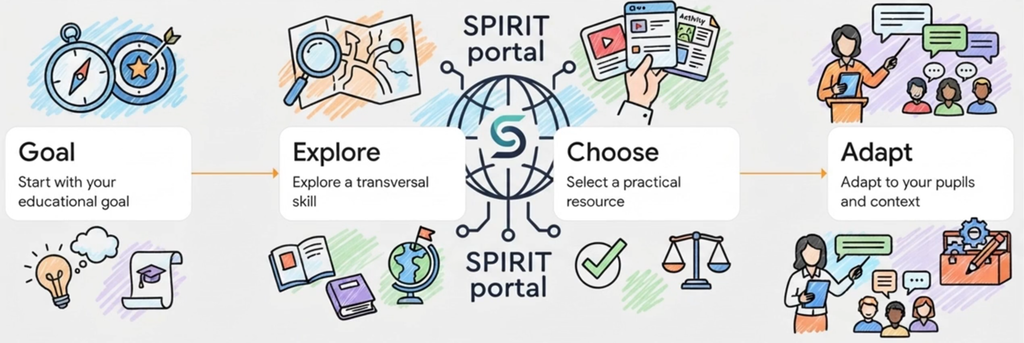
Start with your educational goal, choose a skill and a practical resource, then adapt it to your pupils and teaching context.
3. Who is the video for?
The guide is designed for primary school teachers, teacher trainers, and other education professionals who want a quick, practical introduction to the portal. It can also be used as a starting point in a professional development session or shared with colleagues who are new to SPIRIT.
Let’s explore the SPIRIT portal
Use these quick links to go directly to the area you need.